Why does choosing the right image format matter so much?
Images account for more than 50–60% of an average website's data traffic. Photos saved in an oversized or unsuitable format slow down page loading dramatically, hurting your Core Web Vitals scores (especially LCP — Largest Contentful Paint) and increasing your visitors' bounce rate.
The three most widely used formats are JPG, PNG and the modern WebP. Each has its own strengths and use cases.
1. JPG (JPEG): the timeless classic for photos
JPEG (Joint Photographic Experts Group) has been the backbone of digital photography and the web since the early 1990s. It uses lossy compression, which means it discards visual details the human eye is less likely to notice in exchange for smaller files.
When should you use JPG?
- Rich, realistic photos (landscapes, portraits, product shots).
- When maximum compatibility is the goal — every device in the world, older TVs and embedded systems included, can open it.
- Print preparation or traditional desktop publishing.
Its drawback: no transparency support, and around sharp edges (text, logos, icons) it leaves characteristic compression artifacts.
2. PNG: the master of crisp graphics and transparent backgrounds
PNG (Portable Network Graphics) is the champion of lossless compression. It never discards pixels, so every pixel renders exactly as it was drawn.
When should you use PNG?
- Logos, icons and illustrations where sharp edges and clean lines are essential.
- Any graphic that requires a transparent background (e.g. a store product image with no backdrop).
- Screenshots containing text.
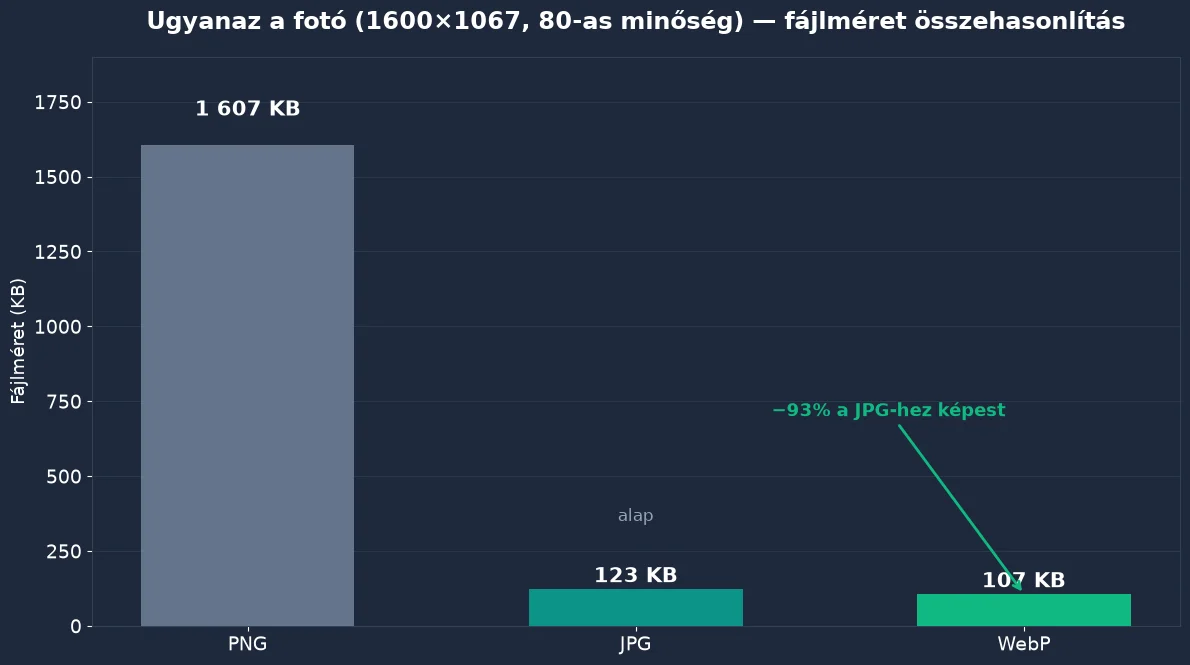
Its drawback: for detail-rich photos the file size can be enormous — a single image can easily reach 5–10 MB, which is completely unsuitable for the web. If you have such an image, convert it to JPG — or even better, WebP!
3. WebP: Google's format built for the future
Google created WebP in 2010 with the explicit goal of making the web faster. It supports both lossy and lossless compression, and on top of that it handles transparency and animation too!
Why is WebP the gold standard of the modern web?
- On average 25–35% smaller files than JPG at the same visual quality.
- Transparent images can be up to 26% smaller than PNG.
- Supported by every modern browser (Chrome, Safari, Firefox, Edge, Opera) since 2020.
A practical comparison table
| Aspect | JPG | PNG | WebP |
|---|---|---|---|
| Compression | Lossy | Lossless | Both |
| Transparency | No | Yes (Alpha) | Yes (Alpha) |
| Typical file size | Medium | Large (for photos) | Smallest |
| Best suited for | Photos, print | Logos, icons, diagrams | Websites, web stores |
Conclusion: which one should you pick?
If you run a modern website or online store, the golden rule is simple: convert every image to WebP using our JPG to WebP or PNG to WebP converters. Your visitors will thank you for the lightning-fast loading, and Google will reward your site with better rankings!